Floorplan commands
Floorplan->Initialise Floorplan
(Re)Initialises the floorplan.
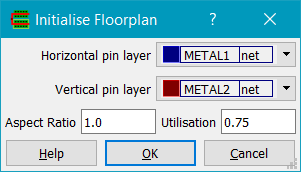
The Horizontal pin layer and Vertical pin layer fields set the layer for pins created on the top/bottom and left/right edges of the design boundary, respectively. Aspect ratio is the block aspect ratio, with numbers greater than 1 representing tall blocks and numbers less than 1 giving wide blocks. Utilisation is the desired cell utilisation, i.e. the ratio of total cell area to design boundary area.
Floorplan->Create Rows...
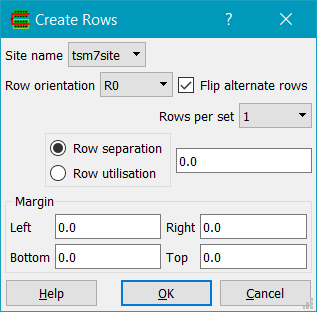
Creates rows for use with Place & Route. The design must have standard cells and a valid design boundary (a rectangle on the boundary layer). A valid Site name must exist, which will normally be found automatically from the library is a cell exists with the boolean property 'site'. Row orientation is the desired row orientation - R0, R180, MX and MY create horizontal rows wheras the rest create vertical rows. Flip alternate rows if checked will flip the orientation of adjacent rows to provide power track sharing in libraries that support it. Rows per set can be either 1 or 2 and specifies the number of rows placed together before any row spacing is applied. Row separation is the seperation between sets of rows, in microns. Altenatively Row utilisation can be give as a percentage. Margin specifies a margin around the rows, which are created inside the design boundary (boundary layer).
Floorplan->Create Groups...
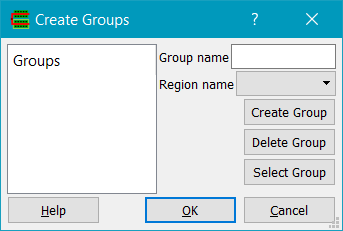
Creates and/or edits groups for use with Place & Route. Any existing groups are shown in the Groups list box on the left; clicking on a group in the list box updates the Group name field, and also the Region name field if there is a region associated with the group. Groups can be created using Create Group; instances must be selected first and a Group name must be specified (or be an existing group name). Delete Group will delete a group specified by the Group name. Select Group will select all instances of the group in the Group name field.
Floorplan->Create Region...
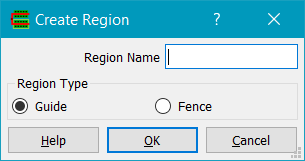
Creates a region for use with Place & Route. A region is a rectangle on the Region layer with string properties type and name. Regions can be of type Guide or Fence. Fence regions are hard constraints whereas Guide regions are soft constraints.
Floorplan->Placement->Place Cells...
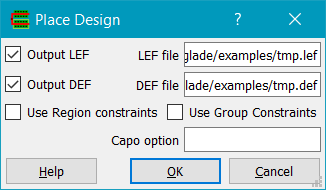
Places cells in rows using the UCLA Capo placer. Glade exports LEF and DEF from the current design and invokes Capo; on completion, Glade reads in the placed DEF.
The design must have rows for placement of cells, as defined using the Row layer, and a valid design area as defined by the boundary layer. Placement regions may exist as defined by the Region layer.
Currently only horizontal cell rows are supported for placement - this is a limitation of the Capo code. Rows can be flipped and cell orientations will obey row orientations (this is a bugfix from the distribution Capo code which assumes all rows are N orientation)
Floorplan->Placement->Unplace Cells
Unplaces all standard cells. Cells are moved to the right of the design area and have their orientation set to R0 and placement status set to unplaced.
Floorplan->Placement->Check Overlaps
Checks for any overlapping standard cells in the design, reporting their names and locations if found.
Floorplan->Route->Global Route...
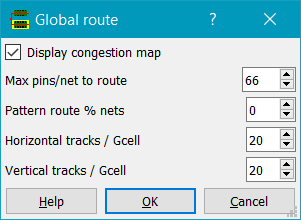
Shortcut: G. Global routes the design. The design must be a placed standard
cell or block design, imported using LEF/DEF or LEF/Verilog, with a design boundary and
routing layers in the technology. Routing tracks are taken from the DEF TRACKS statements.
Global routing divides the design into a grid of bins, known as gcells, and finds the gcells each net passes through, not its exact wires. Each gcell edge has a capacity: the number of routing tracks that cross it, less those blocked by existing net, pin and blockage shapes. The global router works in these steps:
- Builds a Steiner tree for each net, splitting it into two-pin segments.
- Pattern routes every segment, shortest first.
- Rips up and reroutes segments that cross overflowed gcell edges, using a maze router, until there is no overflow or it stops improving.
- Assigns a routing layer to each part of each segment.
The dialog has these fields:
- Horizontal tracks / Gcell and Vertical tracks / Gcell set the gcell width and height, in tracks of the lowest routing layers (default 15). Smaller gcells give a more accurate picture of congestion but take longer to route.
- Use DEF GCELLGRID sizes the gcells from the design's DEF GCELLGRID instead, if it has one in both X and Y.
- Options... opens Global Route Options.
The gcell size and the options are kept for the rest of the Glade session, and Detail Route uses them too.
A global route doesn't change the design. When it finishes, the message window reports the number of nets routed, the total overflow and the number of overflowed gcell edges, the iterations run and the time taken, and the congestion map is shown. The global route is kept for Display Globally Routed Net until the next route is run.
The congestion map draws the gcell grid, colouring each gcell edge by its utilisation (tracks used / tracks available):
| Colour | Utilisation |
|---|---|
| Grey | below 50% |
| Blue | 50% to 70% |
| Cyan | 70% to 85% |
| Green | 85% to 100% |
| Yellow | exactly full |
| Red | overflowed by up to 20% |
| Magenta | overflowed by 20% to 50% |
| White | overflowed by more than 50% |
The equivalent Python command, which is written to the log when you click OK, is:
ui().globalRoute(cv, tracksPerGcell=15, iterations=30)
cv may be None for the design in the current window.
tracksPerGcell sets both the gcell width and height, and
iterations the rip-up and reroute iterations; the other settings are the
session's ones from the dialogs. It returns False if routing could not be
set up, for example if there are no routing layers.
Floorplan->Route->Global Route Options...
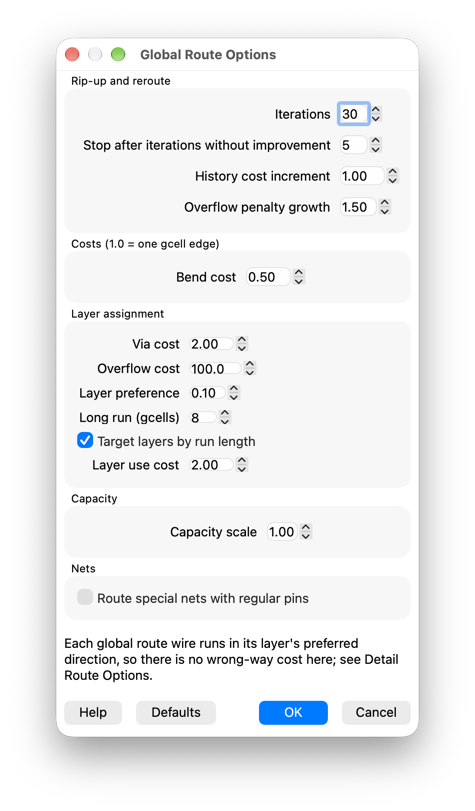
Sets the global router's costs and limits for the rest of the Glade session. Costs are measured in gcell edges, so 1.0 is the cost of crossing one uncongested gcell edge. Defaults sets every field back to its default value.
| Field | Default | Meaning |
|---|---|---|
| Iterations | 30 | Most rip-up and reroute iterations. 0 keeps the pattern route. |
| Stop after iterations without improvement | 5 | Stop when the total overflow hasn't fallen for this many iterations. |
| History cost increment | 1.0 | Cost added each iteration to every overflowed gcell edge, so later routes avoid edges that keep overflowing. |
| Overflow penalty growth | 1.5 | Each iteration the penalty for using a full gcell edge is multiplied by this. |
| Bend cost | 0.5 | Cost of each bend in a route. |
| Via cost | 2.0 | Layer assignment: cost of each layer change, including from the pin layers. |
| Overflow cost | 100 | Layer assignment: cost of each track over a layer's capacity on a gcell edge. |
| Layer preference | 0.1 | Layer assignment: cost per layer that steers short runs to lower layers and long runs to upper layers. |
| Long run (gcells) | 8 | Runs at least this long prefer upper layers. |
| Target layers by run length | off | Layer assignment: instead of steering short runs down and long runs up, steer each run towards a target layer: the bottom layer for runs shorter than Long run, one layer pair higher for each doubling beyond that. The middle layers then get the medium runs and only the longest reach the top, which saves vias (ISPD-18 test4: 1.7% fewer, the top layer 24% used instead of 33%). The detail route's Fast flow turns it on when it makes its own global route; tick it here when you global route first and detail route with Use current global route. |
| Capacity scale | 1.0 | Multiplies every gcell edge's capacity. Below 1 makes routing harder, for testing. |
| Route special nets with regular pins | off | Route a net in the DEF SPECIALNETS section that also has pins in the NETS section, such as a clock with a pre-routed spine, to its NETS pins. Its SPECIALNETS pins are not routed. Power and ground nets are never routed. |
Each global route wire runs in its layer's preferred direction, so there is no wrong-way cost in the global router. The detail router's wrong-way cost is in Detail Route Options.
Floorplan->Route->Display Globally Routed Net...
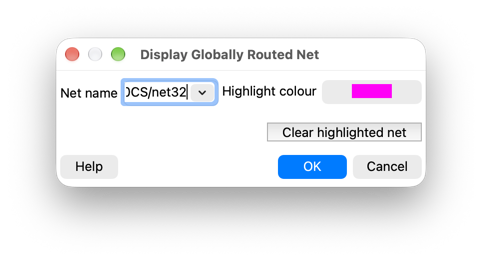
Shortcut: Shift+G. Highlights a net's global route. Run
Global Route or Detail Route first.
Choose or type the Net name and click OK. The net's gnodes are drawn at the
centres of their gcells, with a bar along each link from a gnode to its neighbour:
- A filled square is a pin. Its gcell centre is shown, not the pin's real position.
- An outlined square of the same size is a Steiner point, where the net's tree branches.
- A small filled square is a bend or a layer change.
If a gcell has more than one kind of gnode, only the most important is drawn: a pin, then a Steiner point, then a bend. The number of each, the number of links, and the route's horizontal, vertical and total lengths are reported in the message window.
Highlight colour sets the colour the net is drawn in; each net keeps the colour it was drawn with, so several nets can be shown in different colours. Clear highlighted net removes them all, as Clear Highlighted Net does. A net with no global route has fewer than two pins, or was not routed, such as a power, ground or special net (see Route special nets with regular pins in Global Route Options). A net with all its pins in one gcell is shown as a single gnode.
Floorplan->Route->Clear Highlighted Net
Removes the nets shown by Display Globally Routed Net. Other highlights are kept.
Floorplan->Route->Toggle Congestion Map
Shortcut: =. Shows or hides the congestion map from the last global route.
See Global Route for its colours.
Floorplan->Route->Detail Route...
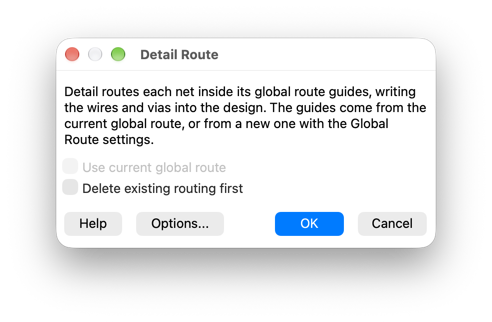
Detail routes each net inside the gcells its global route uses (its route guides), and writes the wires and vias into the design. The global route is the one already made by Global Route, or a new one made first with the Global Route settings (see Use current global route below).
Nets are routed one at a time, shortest first. Each net's wires are added to the design straight away, so later nets route around them. A multi-pin net is grown as a tree: the unconnected pin nearest the routed part of the net is connected to it next. Routing outside the net's route guides is allowed but costs more. A connection that fails is retried in a larger area using every layer. Nets that are still incomplete are then ripped up and rerouted, along with the nets in their way. Finally, pin-clearing passes rip up the nets next to each failed pin and route the failed net first; if that leaves things worse, the earlier routing is put back. Routing keeps each layer's spacing, avoids end of line violations and lengthens pieces under the layer's minimum area; it can also keep the wider spacing of layers' spacing tables and run design rule repair passes. See Detail Route Options.
The dialog has these fields:
- Use current global route: detail routes in the guides of the global route
on the canvas, made by the last Global Route of this design,
instead of global routing again. The global route stays on the canvas, for the
congestion map and
Display Globally Routed Net. It is ticked by default, and
your choice is remembered for the session, but it is greyed out (and a new global
route is made) if there is no global route of this design: run Global Route first.
Untick it to global route again, which you should do if:
- the design has changed since the global route: the global route is not updated for edits, although detail routing is refused if nets it routed have been deleted;
- Delete existing routing first is ticked as well: the global route counted the tracks used by the routing being deleted as blocked, so its guides avoid space that is now free. The message window warns when this happens;
- you have changed the Global Route Options or the Global Route gcell size since: they are only used when a new global route is made.
- Delete existing routing first: deletes the wires and vias of the regular nets
before routing, as Delete Routing does, and with Route special nets with regular pins in Detail Route Options, the regular (
NETSsection) wiring of those special nets. Otherwise existing routing is kept and treated as an obstruction. - Options... opens Detail Route Options.
A progress dialog shows the current pass and how many nets are done, and the message window shows each step as it starts, including the setup before the first pass (pin access, the shapes in instances, track assignment). Clicking Cancel stops routing within a few seconds, even while threads are routing: no new net or clip is started and searches under way stop. The routing finished so far is kept and the remaining nets are counted as failed (the design-wide check at the end is skipped). When it finishes, the message window reports the nets routed, the connections that failed, the number of vias, the wire length, the retries and rip-ups, and ends with the route's total time, global and detail. With Mark unrouted pins in Detail Route Options, each unconnected pin of the failed nets gets a marker for the DRC marker browser. The congestion map of the new global route is shown as well; when the current global route is used, the message window says so and its congestion map stays.
The equivalent Python command, which is written to the log when you click OK, is:
ui().detailRoute(cv, tracksPerGcell=15, globalIterations=30, detailIterations=5, deleteExisting=False,
                 useCurrentGlobalRoute=False)
cv may be None for the design in the current window. The other
settings are the session's ones from the dialogs. It returns False if
routing could not be set up or was cancelled. With useCurrentGlobalRoute=True
it uses the global route kept from the last ui().globalRoute (or Global
Route) of cv, which must be in the current window, and ignores
tracksPerGcell and globalIterations; it returns
False if there is no such global route. The default, False,
always global routes first, as scripts written before this argument expect.
Floorplan->Route->Detail Route Options...
Sets the detail router's costs, limits, passes and design rule handling for the rest of the Glade session. The fields are on two tabs: Routing (costs, search window, the rip-up, region and pin-clearing passes, and the nets and threads) and Design rules and reporting. Defaults sets every field back to its default value.
Routing tab
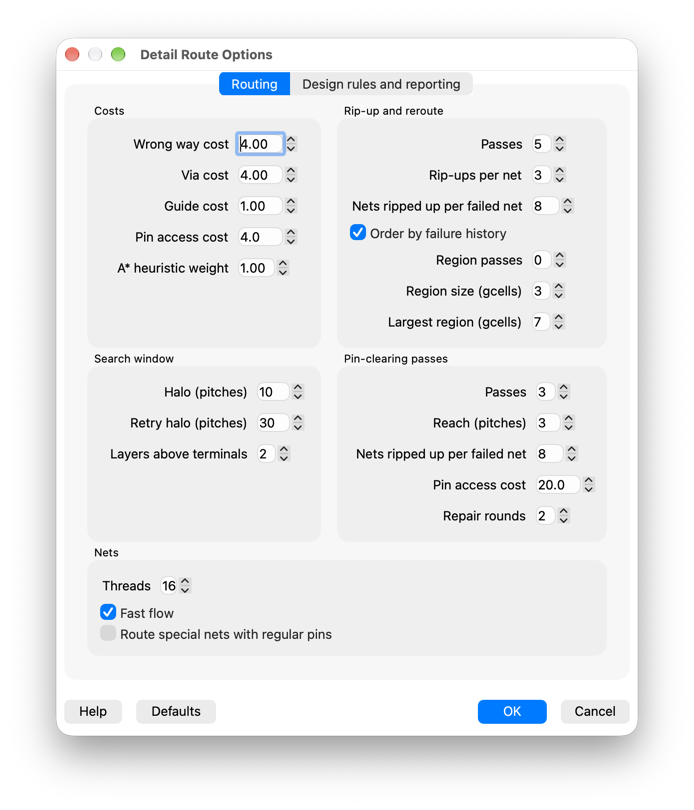
| Field | Default | Meaning |
|---|---|---|
| Costs | ||
| Wrong way cost | 4.0 | Cost multiplier for wire against a layer's preferred direction. |
| Via cost | 4.0 | Cost of a via, in pitches of the lower layer. |
| Guide cost | 1.0 | Extra cost factor for moves outside the net's global route guides. |
| Pin access cost | 4.0 | Cost, in pitches, of a node on the layer above another net's pin, where its via would land. 0 turns it off. |
| A* heuristic weight | 1.0 | 1 finds the cheapest route; higher is faster but may find worse routes. |
| Search window | ||
| Halo (pitches) | 10 | Margin around each connection's bounding box. |
| Retry halo (pitches) | 30 | Margin for the wider retry of a connection that failed. |
| Layers above terminals | 2 | Layers above the higher terminal a connection may use. The retry uses every layer. |
| Rip-up and reroute | ||
| Passes | 5 | Most rip-up and reroute passes after the first pass. 0 keeps the first pass. |
| Rip-ups per net | 3 | Most times one net may be ripped up to make room for others. |
| Nets ripped up per failed net | 8 | Most nets ripped up for one failed net. |
| Order by failure history | on | Take failed nets, and the nets ripped up for them, most-failed first. |
| Region passes | 0 | After the pin-clearing passes, reroute square regions around the pins still failing: the nets there are cut at the region and joined again on one grid for it, and the region is kept only if it has fewer failed pins. 0 turns them off. |
| Region size (gcells) | 3 | A region's side in the first region pass. It grows in later passes, up to the largest size. |
| Largest region (gcells) | 7 | The largest a region grows to. |
| Pin-clearing passes | ||
| Passes | 3 | Passes for nets still failing after rip-up and reroute. 0 turns them off. |
| Reach (pitches) | 3 | How near a failed pin another net's routing must be for it to be ripped up. |
| Nets ripped up per failed net | 8 | Most nets ripped up for one failed net in the first pass. |
| Pin access cost | 20 | Pin access cost, in pitches, for the failed net in these passes. |
| Repair rounds | 2 | Rip-up and reroute rounds for nets that fail after being ripped up to clear a pin, before deciding whether to keep the result. |
| Nets | ||
| Threads | the CPU's cores (ARM), or twice its cores (x64) | Threads the detail route runs on, at most the CPU's hardware threads. Nets (and design rule clips) whose areas don't meet are routed at once, and the result is the same on any number of threads. The first pass, the minimum area patches, the design rule clip passes and the final check use them; the rip-up, pin-clearing and region passes still route one net or region at a time. 0 routes one net at a time throughout, as before. |
| Fast flow (experimental) | off | A faster flow for large designs, which overrides the related options:
|
| Route special nets with regular pins | off | Route a net in the DEF SPECIALNETS section that also has pins in the NETS section, such as a clock with a pre-routed spine, to its NETS pins. Its SPECIALNETS pins are not routed, and its special wiring is kept and may be used by it. Power and ground nets are never routed. Turn on the same option in Global Route Options too, or the net has no global route guides. |
Design rules and reporting tab
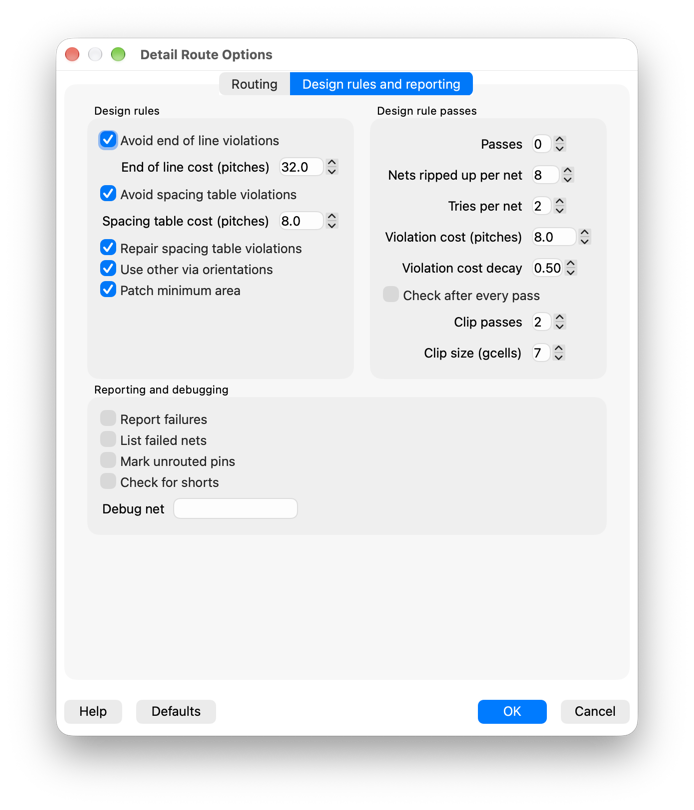
| Field | Default | Meaning |
|---|---|---|
| Design rules | ||
| Avoid end of line violations | on | Keep out of other nets' line ends, and keep the route's own line ends clear, on layers with an end of line rule (techfile MINEOLSPACE, LEF SPACING ... ENDOFLINE). |
| End of line cost (pitches) | 32.0 | Cost of a move that breaks an end of line rule. |
| Avoid spacing table violations | off | Keep the wider spacing that layers' parallel run length spacing tables (techfile MINSPACETABLE, LEF SPACINGTABLE PARALLELRUNLENGTH) need from wide metal, including wide via pads. Moves closer than that cost more rather than being blocked, and minimum area patches keep it. Track assignment leaves out the layers whose default via pads need more than the layer spacing, since segments packed on their tracks leave other nets' vias no room; the search routes those layers. Up to about twice as slow on such designs (ISPD-18 test3: 1.8 times). |
| Spacing table cost (pitches) | 8.0 | Cost of a move closer to wide metal than its spacing table needs. |
| Repair spacing table violations | off | With spacing table violations avoided, the design rule clip passes reroute the ones left too, as they do end of line and minimum area violations. Few are fixed (ISPD-18 test3: 897 to 836), and it can take much longer (205 s to 272 s). |
| Use other via orientations | on | Where the default via between two layers is blocked, or breaks an end of line or spacing table rule, on a pin or where its pads come too close to wide metal, try the other single cut vias between them with the same cut and pads no larger than the default's (for example the other pad orientations), and use the one that costs least. It costs no noticeable time. |
| Patch minimum area | on | After routing, lengthen pieces under the layer's minimum area where there is room. |
| Design rule passes | ||
| Passes | 0 | Passes that rip up and reroute nets with design rule violations, with past violations costing more. 0 turns them off: on dense end of line designs they can take several times the rest of the route. |
| Nets ripped up per net | 8 | Most nets that a net's end of line violations are with, ripped up with it. |
| Tries per net | 2 | Times a net is put back without fewer violations before later passes leave it alone. |
| Violation cost (pitches) | 8.0 | Cost of routing through a past violation. |
| Violation cost decay | 0.5 | Each pass, past violations' weight is multiplied by this. |
| Check after every pass | off | Count violations after every pass, for the pass reports. Each check is a design-wide run. |
| Clip passes | 2 | After the other passes, the design is tiled with square clips, and each clip with violations is rerouted: its nets are cut at the clip and joined again, with past violations costing more, and the clip is kept only if it has no more failed pins and fewer violations. Each pass moves the clips by half a clip. On the ISPD-18 tests two passes remove about two thirds of the violations and about double the detail route's time; a third pass removes few more. With threads, clips that don't meet run at once. 0 turns them off. |
| Clip size (gcells) | 7 | A clip's side. |
| Reporting and debugging | ||
| Report failures | off | Report each failed connection and the router's progress in the message window. |
| List failed nets | off | After routing, list the nets left with pins unconnected, by name, with how many of their pins, in the message window, so you can check them afterwards (for example with Select Net or Display Globally Routed Net). With Cancel, the nets not yet routed are listed too. |
| Mark unrouted pins | off | At the end of the detail route, put a marker on the marker layer around each unconnected pin of the failed nets, for the DRC marker browser: their rule is Route: unrouted pin, or Route: unrouted pin (route cancelled) for a net Cancel left unfinished, and each has the net's name in its net property. The markers of an earlier route are deleted first; DRC's own markers are left. |
| Check for shorts | off | Report wires that overlap other nets' routing. Slow. |
| Debug net | Report each connection of the nets whose names contain this text. | |
Floorplan->Route->Delete Routing
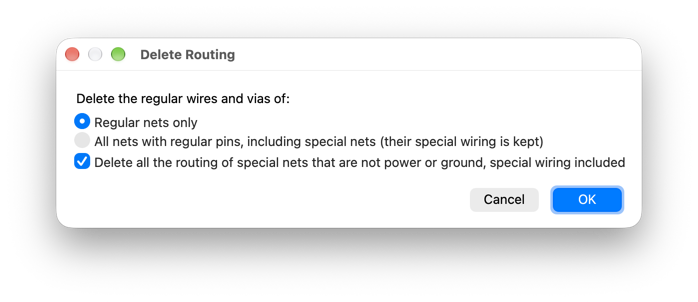
Deletes the wires (paths and segments) and via instances of nets at the top level of the design. A dialog asks which nets:
- Regular nets only deletes the routing of the regular nets. Special nets, such as power, ground or a clock, keep all their routing.
- All nets with regular pins, including special nets also deletes the regular
(
NETSsection) wiring of special nets, such as a clock's routing to regular pins. Their special (SPECIALNETS) wiring is kept.
With Delete all the routing of special nets that are not power or ground checked
(the default), a net in the DEF SPECIALNETS section that is not power or
ground, such as one with USE SIGNAL, loses all its routing, its special wiring
included. Power and ground nets keep their special wiring whatever the choice.
Pins and other shapes are kept. The number of objects deleted is reported in the message window.
The equivalent Python command is:
ui().deleteRouting(cv, specialToo=False, regularOfSpecialNets=False, specialSignalNets=False)
cv may be None for the design in the current window. If
specialToo is True, special nets' routing is deleted as well.
regularOfSpecialNets is True for the second choice in the dialog,
and specialSignalNets is True for the check box.
It returns the number of objects deleted.
Floorplan->Filler Cells->Add...
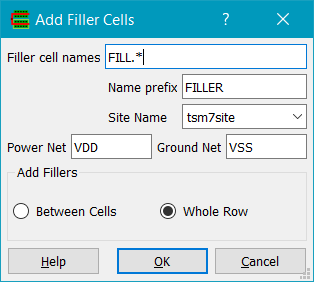
Adds filler cells. Rows must be present in order to add filler cells. The filler cells are specified by the filler name pattern given (e.g. FILL*). The instance names of fillers are prepended by the given name prefix and a count, e.g. FILLER1234. The site name needs to be specified from the list of site names. Power Net and Ground Net are the names of the power and ground nets that the filler cells should be connected to. Fillers can be added either for the whole row, or just between cells.
Floorplan->Filler Cells->Delete...
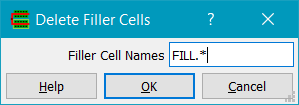
Deletes cells matching the pattern. Note that this can be used to delete any cells matching the pattern, not just filler cells.
Floorplan->Highlight Net Types...
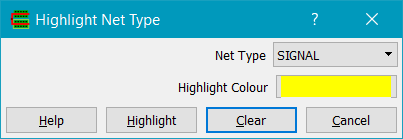
Highlights DEF nets by type i.e. SIGNAL, ANALOG, CLOCK, POWER, GROUND, RESET, SCAN, TIEOFF.
Edit->Replace Views...
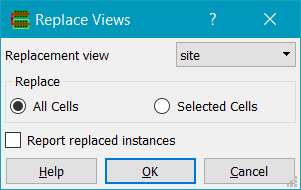
This command is now on the Edit menu. Replaces instances with masters of one view type with masters of another view type. Replacement view is the view to replace the existing master's view with. All Cells will replace all instances in the current cellview. Selected Cells will replace just the instances in the selected set.